Multi-Player Mode: Why Teams That Use Zarr Need Icechunk


Software Engineer
Bring reliability, scalability, and version control to your Zarr datasets, without giving up performance.
Zarr is a powerful protocol for storing large-scale, multi-dimensional arrays. It’s fast, scalable, and cloud-native, which is why it’s used across a variety of domains like climate science and genomics. But while Zarr excels at performance and scalability, it wasn’t designed for collaborative environments.
If your team is building data pipelines, machine learning models, or web apps that depend on shared Zarr datasets, you’ve probably run into a fundamental issue: Zarr doesn’t support multi-player mode.
What is “Multi-Player Mode”?
Multi-player mode is what happens when multiple users or systems are reading from and writing to the same Zarr dataset in cloud object storage at the same time, a very common scenario in team and multi-process settings.
Consider this example: User A begins an update, perhaps replacing an entire time series or writing out the results of a new simulation. This operation touches hundreds or thousands of Zarr chunks and may take seconds or even minutes to complete.
Two common failure modes arise in this situation:
- Inconsistent reads. If User B starts reading the dataset partway through User A’s update, they may see a mix of old and new chunks, inconsistently sized arrays, partially deleted groups, or partially added arrays. There’s no clear boundary between “before the update” and “after the update.” Instead, the dataset appears in an undefined, in-between state.
- Conflicting writes. Meanwhile, if User C begins a different update at the same time, both updates may interleave unpredictably. Some chunks end up from User A, others from User C, and the final state reflects timing rather than intent. In this case, the dataset isn’t just temporarily inconsistent, it can be permanently corrupted.

For downstream systems that expect stable inputs like dashboards, models, or quality-control pipelines, these failure modes can lead to silent errors, confusing bugs, or incorrect results. Worse, if User B’s read powers a customer-facing application, the inconsistencies could leak directly to end users.
This isn’t just a theoretical problem; it’s a fundamental limitation of the Zarr storage model. Because Zarr stores each chunk as an independent object (often a separate file in cloud storage), it excels at parallel I/O. But without an added coordination layer, there are no guarantees of consistency across those files.
Icechunk: Git-like Version Control for Datasets
Icechunk was specifically designed to solve this problem by layering transactional semantics and version control on top of Zarr. Here’s how it works:
- Atomic updates: When a user writes an update to an Icechunk dataset, it’s committed all at once. Either the entire update becomes visible, or none of it does. There’s no in-between state.
- Consistent reads: All readers see a consistent snapshot of the dataset, regardless of what updates are in progress or how long those updates take.
- Versioned history: Every update is tracked as a version, so you can go back in time, compare changes, or reproduce past results.
This makes Zarr safe to use in concurrent, real-world workflows where multiple users, processes, or services interact with the same data.
Think of Icechunk like Git for datasets. When you read from an Icechunk dataset, you’re checking out a specific snapshot, just like checking out a specific commit from a Git repository. Even if others commit changes afterward, your view stays fixed until you choose to pull in the latest version.
When you write to your dataset, your changes happen in isolation. They’re not visible to others until you commit. Once committed, that update becomes part of the versioned history, and others can choose when, or if, to incorporate it. This ensures that everyone sees clean, consistent states—no half-written files or partial results.
Icechunk also supports conflict resolution. If two users make changes based on the same parent version, there are structured ways to reconcile those changes, so collaborative updates can move forward without overwriting or losing data. Icechunk will never overwrite your changes with those of some other concurrent user. Read more about conflict resolution in the Icechunk docs.
The best way to illustrate these features is with a code example. First, set up the storage backend (e.g., in memory, S3 bucket, etc.) and create an Icechunk repository. The repository acts as a versioned data store, much like Git for datasets:
Next, create a new branch off of main, just like you would in Git:
Now checkout this branch for read–write access and write some data to the Icechunk-backed Zarr store:
You can immediately read back the dataset from this session:
<xarray.Dataset> Size: 64B
Dimensions:  (x: 4)
Coordinates:
 * x        (x) int64 32B 0 1 2 3
Data variables:
   var      (x) float64 32B ...
But note: until you commit, no other sessions can see these changes.
Once you commit, the data becomes visible to others, similar to finishing a transaction in a database:
Because this commit happened after our read-only session from the previous step was checked out, we need to open a new read-only session to see the updated data (just like running git pull):
<xarray.Dataset> Size: 64B
Dimensions:  (x: 4)
Coordinates:
  * x        (x) int64 32B 0 1 2 3
Data variables:
    var      (x) float64 32B ...
Now consider the case where multiple writes happen at the same time. If two users or processes attempt to modify the same dataset concurrently, Icechunk will detect the conflict and raise an exception at commit time.
Let’s illustrate with a simple 2×2 array of zeros, chunked 1×1 so each element is its own chunk:
Say you have two separate processes (or team members) writing to this dataset at the same time. Both start by checking out the branch independently:
Each writes to a different chunk in the dataset:
Session 1 commits first:
Now when Session 2 tries to commit, Icechunk detects that the branch has moved forward since Session 2 started. To prevent overwriting Session 1’s changes, Icechunk raises a conflict:
The fix is simple: rebase Session 2 onto the latest branch state, then retry the commit:
Now the branch contains both updates, with no data lost:
If two sessions do write to the same chunk, Icechunk will raise a conflict that requires manual resolution, just like Git’s merge conflict resolver. To read more about rebasing and conflict detection, see the Icechunk docs.
Icechunk’s commit/rebase workflow ensures that concurrent writers can safely collaborate without corrupting or losing data, bringing Git-like reliability and clarity to large scientific datasets.
The Bottom Line
If your team works with Zarr and you care about correctness, collaboration, and reproducibility, Icechunk may be the missing piece. It provides the guarantees your workflows need: atomic updates, versioned history, and consistent reads, without sacrificing performance.
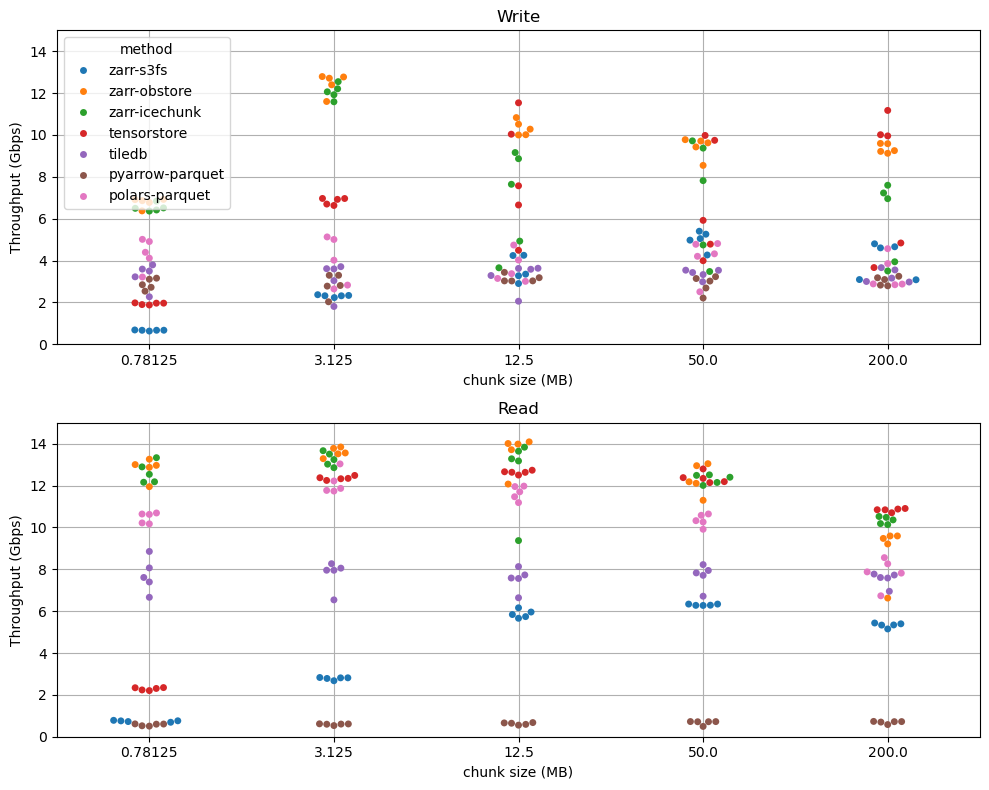
In fact, Icechunk is significantly faster than vanilla Zarr across all workloads we’ve tested thanks to its high-performance Rust implementation. You don’t just gain consistency, you also gain speed.
📈 Read more about Icechunk’s performance at scale here
Whether you’re building scientific workflows, operational data systems, or high-stakes analytics pipelines with terabytes or petabytes of data, Icechunk gives your team a reliable foundation for working with shared Zarr data, safely, efficiently, and at scale.
Software Engineer